

Vertical Layering vs Horizontal Re-sequencing in Game Music
There are two basic ways to make game music react to the player. Vertical layering stacks several tracks that always play in sync and changes how loud each one is. Horizontal re-sequencing plays pieces one after another and changes which piece comes next. Most games use both, and so do mine: EarShot is almost purely vertical, and Snails is mostly horizontal with one vertical trick inside it. Here is how each works, when to pick which, and how to write music that survives being chopped up or stacked.
If adaptive music is new to you, start with Adaptive Music in Games: How It Works, With Examples.
Vertical layering: one piece, many layers
In vertical layering (also called vertical remixing) the composer writes one long loop as separate stems: say atmosphere, bass, drums, melody and a tension layer. All of them start together and never stop. The game only changes their volumes, so the music can thicken or thin out at any moment without ever losing the beat.
EarShot works this way. Its loop is about two minutes long, recorded as nine stems of the same length. Each run picks six of them, and the player’s health decides the mix: a calm set when you’re healthy, faster drums under 75%, a layer of glitches under 20%, each change a three-second crossfade.
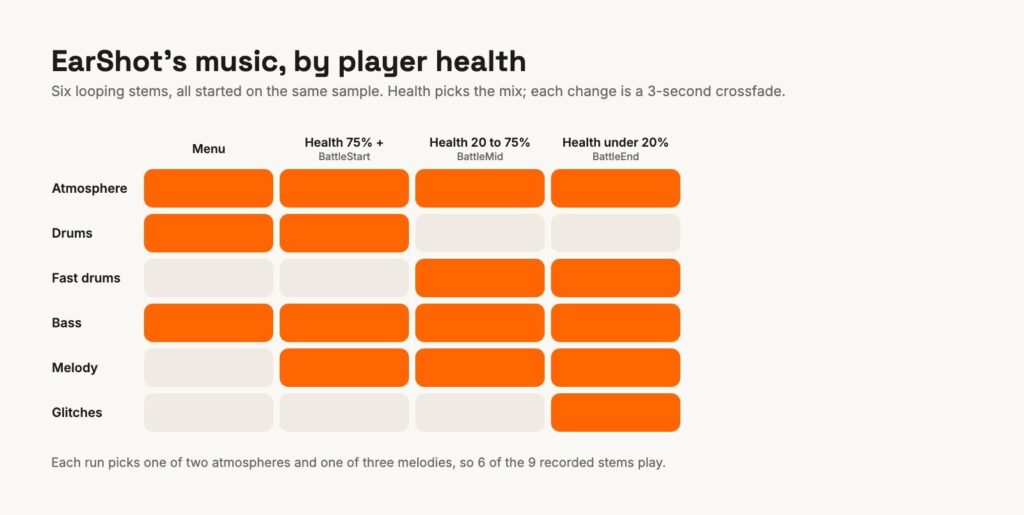
What it’s good at: instant response, because nothing has to wait for a bar line; smooth changes; and a lot of variety from a little music. What it costs: every layer must share one tempo, key and length, and each must sound right alone and in any combination. The arrangement can’t really go anywhere new, because all the layers are the same piece. And memory and CPU grow with the number of stems playing at once.
Horizontal re-sequencing: many pieces, one after another
In horizontal re-sequencing the score is a set of separate pieces or segments, and the game picks what plays next: an exploration loop, a combat loop, a transition, a short victory hit called a stinger. The art is in the joins. Good systems wait for the end of a bar or phrase before switching, and use transition segments written for the gap.
Snails, a two-player race game I made before EarShot, is the simple form of this. Each screen has its own piece: a two-minute theme for the main screen with the high scores, a 45-second race loop, and a 12-second win piece that works as a stinger. When the screen changes, the music changes with it.
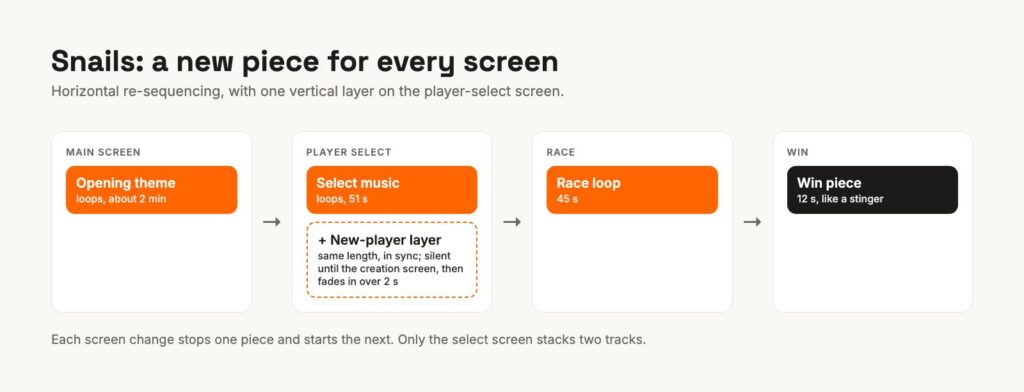
What it’s good at: each piece can be a fully developed composition with its own melody, form and orchestration, and only one plays at a time. What it costs: changes are slower or rougher (you either wait for a musical moment or cut), and every possible join has to be planned and tested.
The hybrid hiding in Snails
Snails also has one vertical moment. On the player-select screen, the music starts a second track, a “new player” layer, at exactly the same position as the select music, and keeps it silent. When the player-creation screen opens, that layer fades in over two seconds on top of the music already playing. Both tracks are exactly the same length, so they stay aligned as they loop.
I wanted the changes to feel smooth, and the model in my head was iMUSE, the system Michael Land and Peter McConnell built at LucasArts for Monkey Island 2. In its town of Woodtick, every building you walk into plays its own version of the town theme on a different instrument, and walking out brings the main theme back with a short flourish. Nothing stops and restarts. The synced layer in Snails is a tiny version of that idea.
The difference between my two games is how they keep layers together. Snails copies the playback position from one track to the other, which is good enough for two layers on a menu. EarShot schedules all six stems on Unity’s audio clock so they start on the same sample, and checks them every few seconds; I wrote about why in Playing Musical Notes in Unity.
Which one should your game use?
| Vertical layering | Horizontal re-sequencing | |
|---|---|---|
| Responds | Instantly | At the next bar, phrase or cut |
| Music can develop | Little: one piece | A lot: many pieces |
| Composing constraint | Same tempo, key and length for all layers | Every join must work |
| Good for | Intensity: danger, health, speed, crowd size | Places and phases: levels, menus, boss stages |
| Runtime cost | Several streams at once | Usually one or two |
A simple rule: if what changes is how intense things are, layer it. If what changes is where you are or what phase you’re in, sequence it. Bigger games do both: they sequence between areas and layer within each one. Composer Winifred Phillips gave a GDC talk on exactly this kind of hybrid structure, and Audiokinetic’s write-up of how Sackboy’s music was scored shows both in one game.
Writing music that survives being cut up
For layers:
- Write the full mix first, then split it. Layers composed one at a time rarely sit well together.
- Give every layer a reason to exist on its own. If the melody only works with the drums, the game can’t separate them.
- Keep the loop seamless: the last bar of every stem must flow into its own first bar, including reverb tails.
For sequences:
- Agree on a grid (tempo and meter) for every piece that can follow another, or write a short transition for each pair that can’t.
- Leave tails out of the loop and play them separately, so a cut doesn’t chop off a reverb.
- Write stingers in the key of what they interrupt, or neutral enough to land anywhere.
Switching on the bar in Unity
Neither of my games needs this, but here is the core of bar-quantized switching in Unity, in case you are building a horizontal system. The idea is to schedule the next piece on the audio clock at the next bar line, using AudioSource.PlayScheduled and AudioSource.SetScheduledEndTime:
// Example only: switch from 'current' to 'next' on the next bar line.
double barLength = 60.0 / bpm * beatsPerBar;
double elapsed = AudioSettings.dspTime - loopStartDsp;      // when the current loop started
double nextBar = loopStartDsp + (System.Math.Floor(elapsed / barLength) + 1) * barLength;
next.PlayScheduled(nextBar);
current.SetScheduledEndTime(nextBar);
iMUSE worked on the same principle: composers put branch and loop markers into the music, so the game could only jump at points that made musical sense. Middleware like FMOD and Wwise do the same thing with transition markers and rules, which is one of the best reasons to use them once a score has many pieces.
Hear it
The quickest way to hear vertical layering is to play EarShot in your browser and take some damage: the drums change under you, and the glitches come in when you’re nearly dead.
I compose and implement music for games, layered, sequenced or both, and wire it into the engine myself. If your game needs that, take a look at Musify your game, or listen to my music first.