

Playing Musical Notes in Unity: How EarShot Stays in Key
In an ear-training game every note has to be exactly in tune, exactly in key and instant. EarShot gets there with four plain tools: one recorded sample per piano key instead of pitch-shifting, a little MIDI-style arithmetic, two voicing rules for chords, and a mixer that ducks the music whenever a note plays. Underneath, the music stems all run on one audio clock. Here is how each part works in Unity, with the real code.
If you want the big picture first, read Adaptive Music in Games: How It Works, With Examples. This post is the code-level follow-up.
One sample per key, not pitch-shifting
The quick way to play any pitch in Unity is one sample and AudioSource.pitch. It works for a few semitones, but pitch in Unity is playback speed: shift an octave and the note also plays twice as fast and loses its character. For a game that trains your ear, that’s not acceptable.
So EarShot has one recorded file per piano key: 88 notes from A0 to C8, named 09 to 96, in two timbres, a piano set and a synth set. Each is about four seconds long. The synth is the default; it felt closer to the game’s pixel-art style. They load once with Resources.Load:
for (int i = 0; i < audioClips.Length; i++)
{
    string clipName = string.Format("MojoPiano/{0}{1}", (i + 9).ToString("D2"), synth ? "s" : "p");
    audioClips[i] = Resources.Load<AudioClip>(clipName);
}
The import settings matter as much as the files. The notes are set to Decompress On Load (plain PCM in memory), so a note starts the instant it’s asked for. The music stems, two minutes each, are Compressed In Memory instead; they start once and keep looping, so a little decoding cost doesn’t matter there.
From “Mi” to a file: the note math
The game thinks in movable-do solfège, with chromatic syllables for the black keys. In code that’s just an enum:
public enum NoteName : int
{
    Do = 0, Di = 1, Re = 2, Me = 3, Mi = 4, Fa = 5, Fi = 6, Sol = 7, Le = 8, La = 9, Te = 10, Ti = 11
}
A question picks a syllable and a random octave, then folds the result into a comfortable range:
note.midiValue = (int)note.noteName + Random.Range(0, 7) * 12;
while (note.midiValue < LOWEST_NOTE) note.midiValue += 12;   // LOWEST_NOTE = 10
while (note.midiValue > HIGHEST_NOTE) note.midiValue -= 12;  // HIGHEST_NOTE = 80
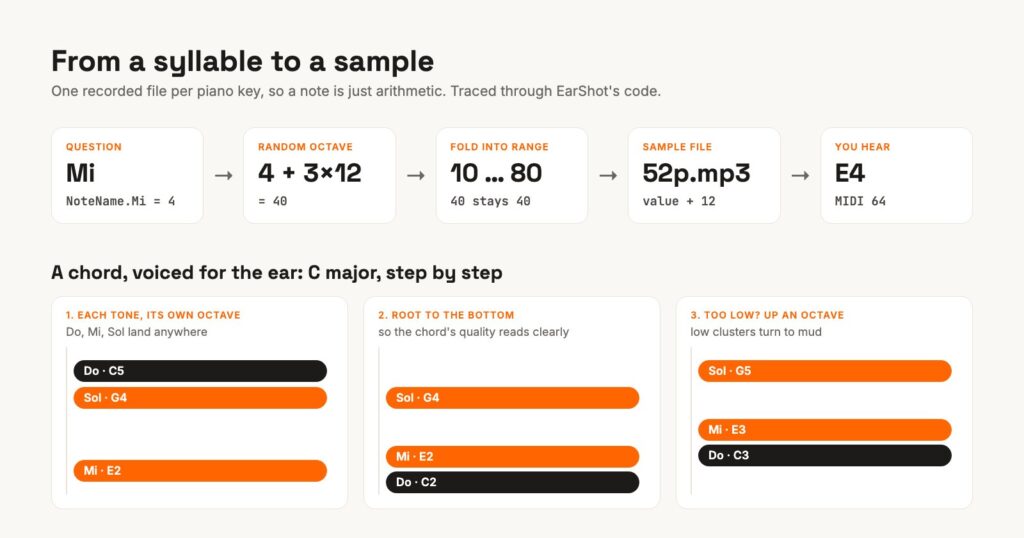
The sample to play is that value plus 12, and the file number plus 12 is the standard MIDI note number. I checked one to be sure: file 57 rings at 440 Hz, A4, MIDI 69. Because every Do is a multiple of 12, Do always lands on a C, the same C the background music sits on. That’s the whole trick for staying in key: there is nothing to tune, only arithmetic.
The random octave is deliberate. If Mi were always the same E, players would memorize one pitch. Moving it between octaves forces them to hear its function, the distance from Do, which is the skill that transfers to real music.
Chords: root at the bottom, never muddy
Chords are defined in the same syllables, so the theory lives in data rather than in code:
{ ChordType.Major, new[] { NoteName.Do, NoteName.Mi, NoteName.Sol } },
{ ChordType.Minor, new[] { NoteName.Do, NoteName.Me, NoteName.Sol } },
{ ChordType.Dom7,  new[] { NoteName.Do, NoteName.Mi, NoteName.Sol, NoteName.Te } },
There are six triad types and ten four-note types, and the player unlocks them as their rank goes up.
Each chord tone gets its own random octave, and that’s on purpose: chords come up in open positions, not only in the stacked textbook order (Do, Mi, Sol from the bottom up), so players learn how a chord sounds rather than one shape of it. Left alone, random octaves also give some ugly voicings, so two rules clean up after them (the diagram above follows a real C major chord through both):
- The root goes to the bottom. If any tone sits below the root, the root drops an octave (or, if it can’t, the other tone rises). In root position the chord’s quality, major, minor or diminished, reads the same way every time.
- Too low means up an octave. If every tone sits below G5, the whole chord moves up an octave, as long as it still fits in the range. Close chords low on a piano turn to mud, and mud is useless for training the ear.
Instant, not on the beat
Most adaptive music waits for the next beat or bar before it changes. The quiz notes don’t. When a question appears, each note plays immediately with PlayOneShot, rotating across four AudioSources so overlapping notes don’t cut each other off, and all chord tones fire in the same frame.
Why not quantize? Because the player is mid-fight and waiting. A note that arrives up to a bar late feels broken, and since it’s always in key with the music it never clashes harmonically. Rhythmically it floats over the score, like a sound effect that happens to be in tune.
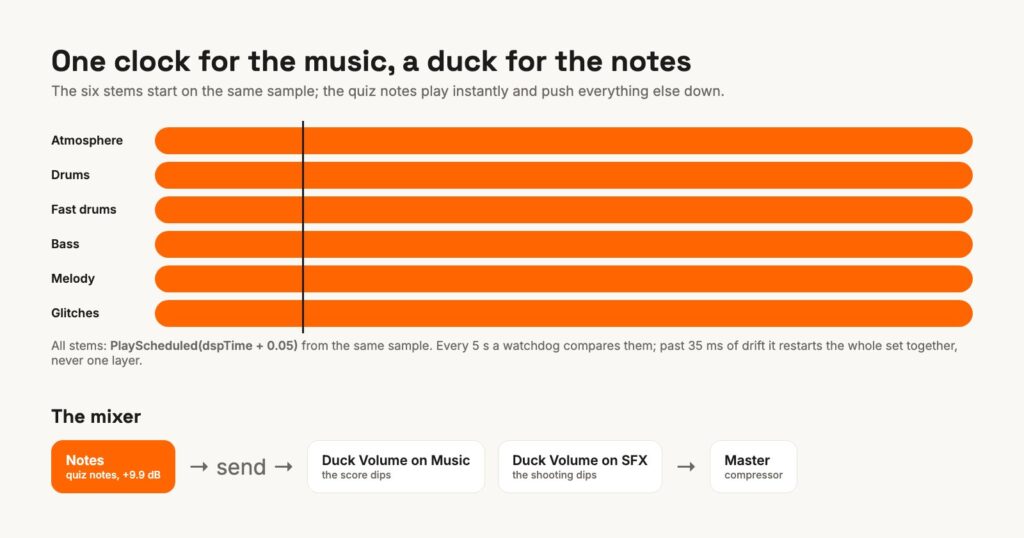
To make sure you can actually hear it in a firefight, the notes have their own mixer group, mixed hot (+9.9 dB), with a send into a Duck Volume effect on both the Music and the SFX groups. Every note pushes the score and the gunfire down for a moment.
The music underneath: six stems on one clock
The notes only make sense against a steady key center, so the score has to stay locked. EarShot’s music is six looping stems chosen from nine (more on that in the first post), and they all start on the same sample:
double startTime = AudioSettings.dspTime + 0.05;
foreach (AudioSource s in selectedStems)
{
    s.Stop();
    s.timeSamples = fromSample;
    s.PlayScheduled(startTime);
}
PlayScheduled against AudioSettings.dspTime is the whole secret: it schedules on the audio clock, not on frames. Then a watchdog runs every five seconds and whenever the app comes back from the background. It compares each stem’s timeSamples with a master stem’s (measuring the distance around the loop point), and if any of them has stopped or drifted by more than 35 ms, it restarts the set.
Three things I learned the hard way:
- Never fix one layer. My first watchdog nudged only the stem that drifted. That made it worse: Unity’s audio moves in blocks, so a single seek lands a little early or late and you hear a flam. Restarting all six together from the master’s position fixed it for good.
- Don’t chase timing with the buffer size. Dropping the DSP buffer from 1024 to 512 made layer timing worse, not better. Sample-locked scheduling was the real fix; the buffer went back to 1024.
- Test Safari early. In the browser version, Unity streams long clips through the browser’s own audio elements, and Safari refuses any that start before the player’s first tap. The game was silent there until it learned to restart the whole stem set from inside that first tap.
If you’re building something similar
- Sample every key when pitch matters. Pitch-shifting is fine for sound effects, not for notes someone has to name.
- Keep the music theory in data: a note enum and chord tables are easy to read, test and extend.
- Choose voicing rules for the ear, not for the math.
- Let the important sound duck everything else, in the mixer rather than in code.
- Schedule layers on
dspTime, and heal drift by restarting the whole set.
You can hear all of this at work: play EarShot free in your browser and listen to the music dip each time a note asks you a question.
I write music and sound for games and build them into the engine myself. If your game needs that, take a look at Musify your game, or listen to my music first.