

Adaptive Music in Games: How It Works, With Examples
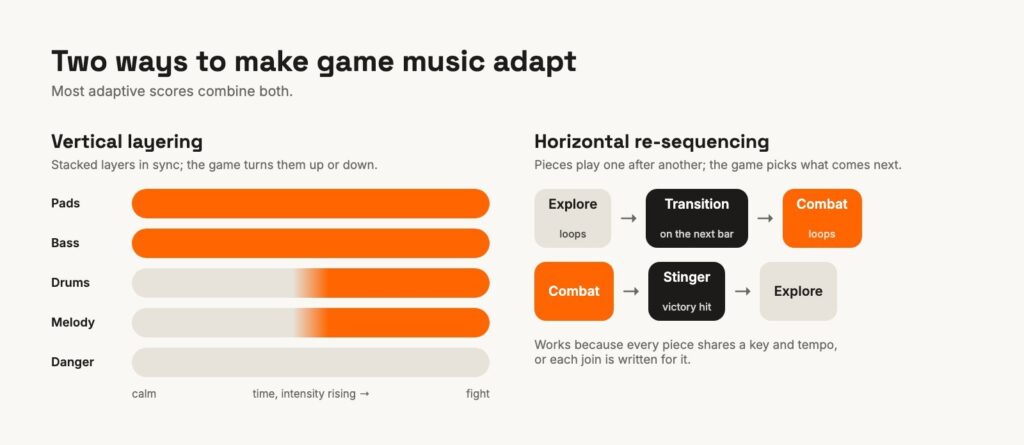
Adaptive music is a game score that changes while you play, following what happens on screen: the music gets denser as a fight heats up, thins out when you explore, and moves to a new section when you reach a new place. There are two basic ways to build it. You can stack layers and turn them up or down (vertical layering), or play pieces one after another and pick what comes next (horizontal re-sequencing). Most real games mix the two.
I write music and I write game code, so I’ve built both sides of this. Below is the theory, a few games worth studying, and the actual system behind the soundtrack of EarShot, my ear-training zombie shooter.
What is adaptive music?
A film score is fixed: the composer knows exactly what happens at 1:32:05. A game composer doesn’t. The player decides when the fight starts, how long it lasts and whether they win, so the music has to be built in pieces that the game can assemble on the fly.
FMOD, one of the two big audio tools used in games, defines adaptive audio simply as audio that reacts to changes in the state of the game. You’ll also see “interactive music” and “dynamic music”. People use the three almost interchangeably; the idea is the same.
Where it started: iMUSE
The best-known early system is iMUSE, built at LucasArts in the early 1990s by composers Michael Land and Peter McConnell. It made its debut in Monkey Island 2: LeChuck’s Revenge (1991): walk from one place to another and the music moves into the next piece without stopping. LucasArts even patented it (US 5,315,057, granted in 1994). I wrote about it and four other milestones in 5 Legendary Adaptive Music Games.
Technique 1: vertical layering
In vertical layering (also called vertical remixing) the music is recorded as several layers that always play together and in sync: pads, bass, drums, melody, maybe a “danger” layer. The game doesn’t change what is playing, only how loud each layer is. Calm moment: pads and bass. A fight: bring in the drums. Low health: add the danger layer.
Composer Winifred Phillips gave a whole GDC 2021 talk on this approach, using her scores for Spyder and Sackboy: A Big Adventure.
Why it’s good: changes are instant and never land on the wrong beat, because every layer is already playing in time. The catch: every layer has to share the same tempo, key and length, and each one has to sound good both alone and in any combination. That’s a real composing constraint.
Technique 2: horizontal re-sequencing
In horizontal re-sequencing the music is cut into segments that play one after another: an exploration loop, a transition, a combat loop, a short victory “stinger”. The game decides which segment comes next, and the switch usually waits for the end of a bar so it lands musically.
Red Dead Redemption (2010) is a famous case. In The Guardian’s interview with composers Bill Elm and Woody Jackson, they explain that the whole score was written in A minor at 130 BPM, so that the game could move from any piece to any other as events changed on screen. Mick Gordon describes something similar for DOOM (2016) in this interview with Bethesda: the game stitches his musical pieces together depending on what the player is doing.
Why it’s good: each segment can be a fully written piece of music, with real development. The catch: changes take time (you wait for the bar line) and every join has to be planned.
Most games use both
In practice these are tools, not camps. A level might re-sequence between sections and layer within each one. Audiokinetic’s write-up of how Sackboy’s music was scored shows both at work in one game, and Austin Wintory’s GDC talk on Journey is about the harder question underneath: keeping adaptive music musical.
If you want to see a complete professional setup from the inside, FMOD publishes the entire FMOD Studio project for Celeste in its documentation. It’s the best free lesson on the subject I know of.
A real example: how EarShot’s music adapts
EarShot is a top-down zombie shooter where every power-up plays a note, and you collect it by naming the note in solfège. I wrote the music, the sound and the code, so here is exactly how its soundtrack works. It’s a small, purely vertical system, built with nothing but Unity’s own audio.
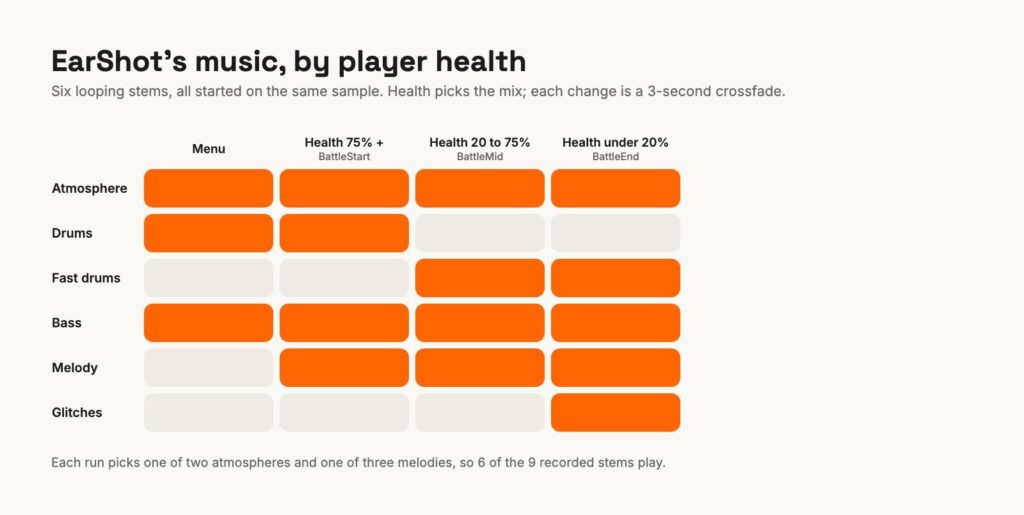
Nine stems, six per run. The music is nine looping stems of the same length (about two minutes): two atmospheres, slow drums, fast drums, bass, three melodies and a glitch layer. Each run picks one of the two atmospheres and one of the three melodies, so six stems play and the music isn’t identical every time you play.
Started on the same sample. All six stems start together with Unity’s AudioSource.PlayScheduled, timed against AudioSettings.dspTime, the audio clock that counts samples rather than frames. Every five seconds a small watchdog checks them; if any layer has drifted by more than 35 milliseconds, it restarts the whole set together. That matters most in the browser version, where audio timing is less predictable.
Health picks the mix. The game has a handful of music states, and each one is simply a volume for every stem. In battle, the player’s health chooses the state: above 75% you hear the slow drums, bass, atmosphere and melody; below 75% the fast drums take over; below 20% the glitch layer joins in. Each change is a three-second crossfade, so the music tightens as you get hurt without ever jumping.
The notes cut through. The ear-training notes are separate from the score: one recorded note per pitch (a piano set and a synth set), played the instant a question appears rather than on the next beat, because a quiz has to answer immediately. In Unity’s Audio Mixer, the notes’ group ducks both the music and the sound effects, so the note you’re asked to name is always the clearest thing you hear. The background music sits on Do (C), the reference you name every note against.
None of this needs middleware. You can play EarShot in your browser and listen for the drums changing as you take damage.
Adaptive music can also go much further. In my guest lecture Adaptive Music Gone Mad (in Hebrew) I showed a two-way system between Unity and Ableton Live: the game changes the music’s key and tempo, and the music’s own rhythm feeds back into the game, driving physics, lights and characters.
Where to start in your own game
- Small game, one programmer? Unity’s built-in tools go a long way:
PlayScheduledfor sample-accurate starts, mixer groups for ducking, and mixer snapshots for smooth state changes. EarShot ships with exactly that. - Lots of states, or a sound designer who wants to tweak without code? That’s what audio middleware is for. Both FMOD and Wwise have free tiers for small budgets (FMOD licensing, Wwise pricing); check the current terms for your project.
- Write for it from the start. Decide early whether the score will layer, re-sequence or both. Layers need a shared tempo, key and length; segments need planned joins. Retrofitting a finished linear track is where most adaptive music goes wrong.
Quick answers
What’s the difference between adaptive and interactive music? In everyday use, nothing. Some people use “interactive” for music the player directly plays or triggers, and “adaptive” for music that follows the game’s state, but most developers use the words interchangeably.
Do you need FMOD or Wwise for adaptive music? No. Small systems like EarShot’s work fine with Unity’s built-in audio. Middleware pays off when the music logic gets complex or a sound designer needs to change it without touching code.
What’s a stinger? A short musical hit played over or between the main music to mark an event: a victory, a discovery, a death.
I compose and implement music for games: the score, the sound, and the code that makes them react. If you’d like your game to sound like this, take a look at Musify your game, or listen to my music first.